Skeleton Retarget | Godot Addon
A downloadable addon
Your rig has bones. Godot's humanoid profile has 56 named slots. Nothing connects them except one dialog you have to reopen for every model.
You imported a Mixamo character and want it to play an animation authored for a different skeleton.
So you open Advanced Import Settings, pick the Skeleton3D, and find the Retarget section: a
bone_map, an auto-map button, and — when something is wrong — a red warning. That is the whole
workflow. One model at a time, inside the import dialog, with no way to see what it decided, no
confidence, and no way to keep the result.
This addon moves that work into a dock.
Why the obvious approach doesn't work
Godot already ships the retargeting classes — SkeletonProfileHumanoid, BoneMap,
RetargetModifier3D. What it does not ship is a way to work on the mapping outside the import
dialog:
bone_mapis an import setting. It lives in the model's.importfile, reachable only through Advanced Import Settings, one model at a time.
- Auto-mapping only runs there, and it reports failure as a coloured warning button — not which slot, not why.
- There is no inspect, no confidence, no reuse. Map the same rig again next project.
And you cannot work around it from script. Verified against every class in ClassDB on 4.7.2:
# No class exposes `bone_map` as a property. This does not compile.
var skel: Skeleton3D = $Model/Skeleton3D
skel.bone_map = my_bone_map   # error: invalid set index 'bone_map'
The mapping is real data with a real type. It just has no home outside one dialog.
What it does
Pick a Skeleton3D in the scene you are editing. The dock lists Godot's required humanoid slots
beside your rig's actual bone names.
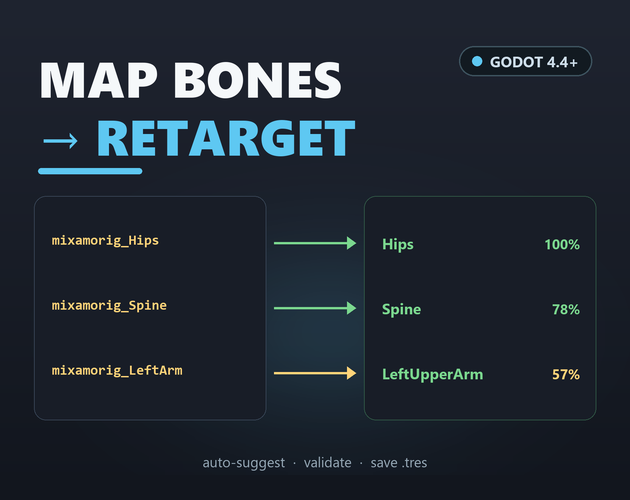
- Auto-suggest proposes a bone for every slot, each with a confidence score.
- Adjust any row from its dropdown.
Required onlyhides the 39 optional slots; the search box filters by slot name.
- Validate reports the problems that matter (below).
- Save BoneMap… writes the mapping to a
.tres. Save Profile… writes aSkeletonProfilethat mirrors your rig.
- Copy import hint puts the exact steps for applying the map onto your clipboard.
Confidence colouring — the legend for the rows:
green   >= 60%    the matcher is confident
amber   50-60%    worth a look before you trust it
red     < 50%     a guess — check this row
manual            you set this row by hand
preset            the row came from a preset file
How auto-suggest works (it is not a black box)
- Normalise each name: strip exporter namespaces (
mixamorig:,DEF-,Bip01,Armature|), splitcamelCaseand separators (_ . - | :), lowercase.
- Score every (slot, bone) pair against a per-slot synonym table (
Hips← hips/pelvis;LeftLowerLeg← left lower leg / calf / shin / knee / leg; …) — exact match, then token-subset, then Levenshtein similarity as a damped fallback.
- Side guard — a
Left…slot scores an obvious right-side bone at ~0.1×, so it can never silently take the wrong side.
- Greedy one-to-one assignment — highest score first; each slot and each bone used at most once.
- Hierarchy repair — chains like
Spine / Spine1 / Spine2(Mixamo) orspine_01 / spine_02 / spine_03(Unreal) cannot be told apart by name alone. Where two mapped slots are simply swapped along the skeleton's own parent chain, they are exchanged. Those rows say so in their tooltip.
Deterministic: same rig in, same mapping out. Every row can explain itself.
Why not just use the import dialog's auto-map?
Because when it fails, it does not tell you how — and you find out when the animation plays backwards.
The dialog shows one warning when a required bone is missing or two slots collide. It does not say
which of the 56 slots, and it does not tell you that your LeftLowerLeg landed on the right leg.
This dock validates four distinct things and names each one:
Check | What it catches |
Required coverage | a required slot that still has no bone |
Duplicates | one rig bone assigned to two slots |
Parent / child | a mapped child that is not a descendant of its mapped parent (e.g. |
Existence | a mapped name that is not present in the selected skeleton |
That is the whole difference: the dialog tells you that it is broken. This tells you what.
What it produces
Action | Output | Notes |
Save BoneMap… | a | the file you want per rig — "which of my bones is |
Save Profile… | a | the programmatic form of the engine's export a SkeletonProfile from a Skeleton3D action |
Copy import hint | clipboard text | the manual steps to apply the map in Advanced Import Settings |
Both are plain text resources — keep them in version control, diff them, reuse them across projects.
What it deliberately won't touch
A tool that claims to handle everything is a tool you stop trusting. This one is explicit about its edges:
- It will not write
.importfiles for you. The_subresourceskey layout is an engine implementation detail; a wrong guess silently corrupts your import settings. Applying a savedBoneMapis therefore a manual step in Advanced Import Settings — Copy import hint gives you the exact clicks. This is the single most important thing on this page; read the limitations below.
- It will not drive a
RetargetModifier3Dor preview two skeletons. It edits resources; runtime retargeting is the engine's job.
- It will not check geometry. No bone lengths, no rest orientation, no T-pose test — that is the import Rest Fixer's job, not this dock's.
- It will not invent bones. A rig whose bones are called
jnt_0,jnt_1,jnt_2has no name signal to match on and must be mapped by hand.
- It will not fill optional slots unless your names resemble them. Fingers, eyes and jaw fill only when the names actually look like them. 17 of the 56 slots are required; the other 39 are optional.
- It will not touch your project. No project settings, no autoloads, nothing written outside
res://(your chosen path) anduser://.
A tool that cries wolf gets uninstalled. Reporting an honest "unmapped" is the point.
Safe by default
This addon writes files, so the safety model is not an afterthought:
Mechanism | How |
Read-only until you say so | The dock inspects your scene and writes nothing until you press a Save button. |
Backup before overwrite | Saving over an existing file first copies it to |
Scope | It writes only under |
No side effects | No autoloads added, no project settings modified, no |
Try it before you install it
Download the demo project — a complete Godot project with the addon already in place and a
22-bone, Mixamo-named Skeleton3D to work on.
- Open it in Godot 4.4 or newer. Enable Skeleton Retarget under Project Settings → Plugins if it is not already on.
- Open the Retarget dock, pick the demo
Skeleton3D, and press Auto-suggest. On the shipped rig this fills 22 of 56 slots — 17 of 17 required — scored 7 green / 15 amber / 0 red. That is the real output on Godot 4.7.2, not an illustration.
- Press Validate, then Save BoneMap… and open the
.tresit writes. That is the whole product, end to end, with nothing staged.
Nothing in the demo is faked — it is the same plugin files you download separately, plus a rig to try them on. The addon's own test suite — 54 assertions — passes on Godot 4.7.2 (54 passed, 0 failed). If the dock does something you don't expect, you find out here, not in your own project.
Known limitations
Read this before you buy in, not after.
A saved bone_map cannot be applied at runtime, and this addon does not write .import files.
In Godot 4.4–4.7.2 no class exposes a bone_map property to script (verified by scanning every
class in ClassDB) — it is purely an import setting. Applying a saved BoneMap is a manual step in
Advanced Import Settings. We could write into the .import _subresources block, but the key
layout is undocumented and a wrong guess corrupts import settings — so we don't.
Bone names cannot contain : or /. Skeleton3D.add_bone() rejects them (verified: returns
-1 and logs "Bone name cannot be empty or contain ':' or '/'."). Godot's own name sanitiser
turns mixamorig:Hips into mixamorig_Hips, which is why the presets store the documented :
form and the dock resolves it against your rig at load time. . is legal, so Rigify's
DEF-upper_arm.L is fine.
The auto-suggest is a name matcher, not a semantic solver. It will not understand a rig whose
bones are called jnt_0, jnt_1, jnt_2. Those must be mapped by hand. Extra bones (twist bones,
IK targets, props) simply stay unmapped — which is correct.
Optional slots are not auto-filled. Fingers, eyes and jaw are only suggested if your rig's names
actually resemble them. SkeletonProfileHumanoid has 56 slots; only 17 are required.
The hierarchy check is structural, not geometric. It verifies that a mapped child bone really is
a descendant of its mapped parent. It does not check bone lengths, rest orientation, or whether the
rig is T-pose — those are RetargetModifier3D / import Rest Fixer concerns.
No runtime preview. The dock edits resources; it does not drive a RetargetModifier3D or play
two skeletons against each other.
Presets ship best-effort bone names. mixamo_humanoid and unreal_mannequin_humanoid are based
on documented public conventions (high confidence); blender_rigify_humanoid is best-effort —
its spine chain is mapped onto the humanoid spine slots by position, not by Blender's name, and
that interpretation is ours. Whether you even have DEF- bones depends on whether you export
Rigify's deform bones or its control bones.
Not verified against a real imported glTF/FBX. The bone names Godot produces from an actual
Mixamo/UE/Rigify export were not tested here — this project contains no third-party rig. The
: → _ sanitisation is verified (tests/probe_names.gd); everything downstream of it is
inferred from that. 待确认 — treat the first run on a real rig as a test.
Licence
MIT. Use it at work, fork it, ship it inside a commercial game. Credit is appreciated but not required.
Feedback
Found a bug, or a rig whose bones the matcher gets wrong? Leave a comment. The most useful reports name the rig (Mixamo / UE / Rigify / custom), the bone names it missed, and what the Validate report said — that tells me in one line whether it's the synonym table or the normaliser. Every missed bone is a bug and I would rather hear about it than ship it.
Download
Click download now to get access to the following files:
Leave a comment
Log in with itch.io to leave a comment.